<?xml version="1.0" encoding="utf-8"?><feed xmlns="http://www.w3.org/2005/Atom" ><generator uri="https://jekyllrb.com/" version="4.4.1">Jekyll</generator><link href="https://blog.opavote.com/feed.xml" rel="self" type="application/atom+xml" /><link href="https://blog.opavote.com/" rel="alternate" type="text/html" /><updated>2026-04-28T22:27:10+00:00</updated><id>https://blog.opavote.com/feed.xml</id><title type="html">OpaVote Blog</title><subtitle>OpaVote blog for online elections and voting</subtitle><entry><title type="html">Fall 2025 Updates</title><link href="https://blog.opavote.com/2025/10/fall-2025-updates.html" rel="alternate" type="text/html" title="Fall 2025 Updates" /><published>2025-10-27T00:00:00+00:00</published><updated>2025-10-27T00:00:00+00:00</updated><id>https://blog.opavote.com/2025/10/fall-2025-updates</id><content type="html" xml:base="https://blog.opavote.com/2025/10/fall-2025-updates.html"><![CDATA[<p>We’re grateful to the hundreds of folks who have written in over the last year. We love that OpaVote has helped y’all make positive changes in your organizations and the world.</p>

<p>Since <a href="https://blog.opavote.com/2024/01/opavote-is-under-new-management.html">our last message</a>, we’ve been living our values to move slow and shape things rather than move fast and break things. We’re making OpaVote more reliable, more sustainable, more accessible, and easier to use. Read on for some of our service improvements!</p>

<!-- excerpt end -->

<hr />

<h2 id="service-improvements">Service Improvements</h2>

<h3 id="self-serve-invoices">Self-Serve Invoices</h3>

<p>Until recently, getting an invoice for your elections meant emailing us and waiting for a reply. Now, you can <a href="https://opavote.com/help/faq#invoices">download invoices instantly from your account—whenever you need them</a>.</p>

<h3 id="keep-your-data-longer">Keep Your Data Longer</h3>

<p>By default, we retain your election data for 10 weeks from the start of an election. In the past, if you wanted us to store it longer, you would have to email us. <a href="https://opavote.com/help/overview#expiration">Now you can extend your data retention directly from your election dashboard.</a></p>

<h3 id="unblock-rejected-ballots">Unblock Rejected Ballots</h3>

<p>Sometimes, voters would opt out of receiving email from us and then be surprised when they didn’t receive a ballot for an election they were looking forward to participating in. Before, they could email us to opt back in, but now may rejoin independently on our new <a href="https://opavote.com/request-unblock">unblock page</a>.</p>

<hr />

<h2 id="case-study-how-equal-exchange-leverages-opavote-to-strengthen-workplace-democracy">Case Study: How Equal Exchange Leverages OpaVote to Strengthen Workplace Democracy</h2>

<p>Equal Exchange—a worker-owned cooperative—needed a voting platform that was clear, accessible, and transparent for every member. Switching to OpaVote eliminated technical issues and gave members confidence in the democratic process.</p>

<p>Learn more about their experience in our <a href="https://blog.opavote.com/2025/04/coffee-chocolate-and-voter-confidence.html">Equal Exchange case study</a>!</p>

<hr />

<h2 id="we-want-to-hear-from-you">We Want to Hear from You</h2>

<p>How are you using OpaVote? What would make OpaVote better for you? Email <a href="mailto:team@opavote.com">team@opavote.com</a> to let us know!</p>

<p>- Ana, Damien, and Zee</p>]]></content><author><name>Zee</name></author><category term="product updates" /><summary type="html"><![CDATA[We’re grateful to the hundreds of folks who have written in over the last year. We love that OpaVote has helped y’all make positive changes in your organizations and the world. Since our last message, we’ve been living our values to move slow and shape things rather than move fast and break things. We’re making OpaVote more reliable, more sustainable, more accessible, and easier to use. Read on for some of our service improvements!]]></summary></entry><entry><title type="html">OpaVote Free Tier Now Offers 10 Weeks of Data Retention</title><link href="https://blog.opavote.com/2025/10/opavote-free-tier-provides-10-weeks-of-data-retention.html" rel="alternate" type="text/html" title="OpaVote Free Tier Now Offers 10 Weeks of Data Retention" /><published>2025-10-08T00:00:00+00:00</published><updated>2025-10-08T00:00:00+00:00</updated><id>https://blog.opavote.com/2025/10/opavote-free-tier-provides-10-weeks-of-data-retention</id><content type="html" xml:base="https://blog.opavote.com/2025/10/opavote-free-tier-provides-10-weeks-of-data-retention.html"><![CDATA[<p>OpaVote’s free tier is perfect for small elections, as well as preparing to run
bigger ones on our online election platform. But the long-standing 2-week data
retention policy was causing confusion and creating an unnecessary sense of
urgency.</p>

<p>Now free-tier elections get the same 10 weeks of data retention that paid
clients receive. If you still want more time, every election has the option to
<a href="https://opavote.com/help/overview#expiration">extend data retention by a year for $40</a>.</p>]]></content><author><name>Zee</name></author><category term="product updates" /><summary type="html"><![CDATA[OpaVote’s free tier is perfect for small elections, as well as preparing to run bigger ones on our online election platform. But the long-standing 2-week data retention policy was causing confusion and creating an unnecessary sense of urgency. Now free-tier elections get the same 10 weeks of data retention that paid clients receive. If you still want more time, every election has the option to extend data retention by a year for $40.]]></summary></entry><entry><title type="html">Coffee, Chocolate, and Voter Confidence: Equal Exchange Leverages OpaVote to Strengthen Workplace Democracy</title><link href="https://blog.opavote.com/2025/04/coffee-chocolate-and-voter-confidence.html" rel="alternate" type="text/html" title="Coffee, Chocolate, and Voter Confidence: Equal Exchange Leverages OpaVote to Strengthen Workplace Democracy" /><published>2025-04-22T00:00:00+00:00</published><updated>2025-04-22T00:00:00+00:00</updated><id>https://blog.opavote.com/2025/04/coffee-chocolate-and-voter-confidence</id><content type="html" xml:base="https://blog.opavote.com/2025/04/coffee-chocolate-and-voter-confidence.html"><![CDATA[<h2 id="executive-summary">Executive Summary</h2>

<p><a href="/img/b/R29vZ2xl/AVvXsEjndpydATC3iKlDJRTXRyGD48-Af2ZEVotpO09mMrh2CeoDWblZoWM5DN2pTYNAbwwy1UClU-vUxzAKIlUpg6meaJ5YCS0betxyacyN5JepKJVT1_SwkTKCImxuPBuRp3VRc79pojWyhJemYNrpbzJyLsHiciKYBD0gzK497ujh9aNGgClCnO5JMobTnsXZ/s6079/equal-exchange-team.jpg"><img src="/img/b/R29vZ2xl/AVvXsEjndpydATC3iKlDJRTXRyGD48-Af2ZEVotpO09mMrh2CeoDWblZoWM5DN2pTYNAbwwy1UClU-vUxzAKIlUpg6meaJ5YCS0betxyacyN5JepKJVT1_SwkTKCImxuPBuRp3VRc79pojWyhJemYNrpbzJyLsHiciKYBD0gzK497ujh9aNGgClCnO5JMobTnsXZ/w320-h184/equal-exchange-team.jpg" alt="Large group of people posing on a lawn in front of a pavilion." title="Equal Exchange Team" /></a>Equal Exchange suffered a contentious and problematic election. As a worker-owned cooperative, it was critical that their members understood the election process and could easily participate. By switching to OpaVote, they eliminated technical difficulties, assessed alternative voting methods, and created complete transparency and ease-of-use for their members. </p>

<!-- excerpt end -->

<h2 id="background">Background</h2>

<p>Equal Exchange is a worker-owned cooperative that embraces democratic business practices. With approximately 100 worker-owners, the cooperative distributes organic, Fair Trade products such as coffee, tea, cocoa, and chocolate. These goods are sourced from small farmer cooperatives in Latin America, Africa, and Asia. Founded in 1986, Equal Exchange is the oldest and largest Fair Trade coffee company in the United States.</p>

<p>Sharyn McWilliams, the Worker-Owner Coordinator, facilitates the annual meetings where worker-owners vote on various positions and proposals. She shared their challenges with us.</p>

<h2 id="the-challenge-previous-election-unclear-and-confusing">The Challenge: Previous Election Unclear and Confusing</h2>

<p>In a previous election, Equal Exchange used another popular voting platform to elect board members. Unfortunately, they did not have the means to explain the voting method of choice, leaving many participants confused about how the votes were counted and how the results were determined.</p>

<p>Equal Exchange was at risk of having to hold a re-election. In response, the cooperative formed an eight-person working group tasked with researching how to improve the voting process, specifically focusing on better educating worker-owners and improving the presentation of results. That’s when they discovered OpaVote.</p>

<h2 id="why-opavote">Why OpaVote?</h2>

<h3 id="comprehensive-knowledge-base">Comprehensive Knowledge Base</h3>

<p>McWilliams and the team benefitted from OpaVote’s vast, accessible educational resources. The platform provided clear, detailed explanations of various voting methods (such as <a href="https://opavote.com/methods/instant-runoff-voting">instant runoff voting</a>, <a href="https://opavote.com/methods/single-transferable-vote">single transferable vote</a>, and <a href="https://opavote.com/methods/approval-voting">approval voting</a>), and recommended the best methods for different kinds of elections (for example <a href="https://blog.opavote.com/2016/02/best-methods-for-electing-group-of.html">electing a group</a> vs. <a href="https://blog.opavote.com/2015/11/electing-single-person.html">electing a single person</a>) in a straightforward, non-technical manner. This was key in helping Equal Exchange make an informed decision about how to structure their voting process.</p>

<h3 id="reliable-and-easy-to-use">Reliable and Easy-to-Use</h3>

<p>The previous voting platform had failed during a member meeting. OpaVote’s straightforward set-up stood out when the team was able to switch to it on the spot in just 10 minutes. </p>

<h3 id="recount-feature">Recount Feature</h3>

<p>OpaVote’s recount tool was invaluable. The team ran recounts with different parameters to see how the results aligned with their expectations. McWilliams and the working group appreciated the ability to test different methods, showing exactly how votes would be calculated. OpaVote’s <a href="https://opavote.com/results/5654402576678912/1">visual representation of vote outcomes</a>, including clear, color-coded breakdowns, helped explain the results in a way that was easy to understand.</p>

<h3 id="cost-effective">Cost-Effective</h3>

<p>OpaVote proved to be both affordable and efficient, offering a cost-effective solution that met Equal Exchange’s needs without exceeding their budget.</p>

<h2 id="results">Results</h2>

<p>Thanks to OpaVote, Equal Exchange avoided a re-vote and, more importantly, ensured that the worker-owners felt confident in the voting method chosen as well as the voting process.</p>

<p>The platform played a pivotal role in helping the cooperative clearly communicate the voting method and results.</p>

<p>The experience led to a significant change in their election process:</p>

<ul>
  <li>Voting Process Codification: Equal Exchange specified their voting process in their official bylaws.</li>
  <li>Educational Commitment: McWilliams, the Worker-Owner Coordinator, now educates the worker-owners on the voting methods prior to each annual meeting, ensuring everyone understands the process in advance.</li>
</ul>

<p>OpaVote was instrumental in transforming Equal Exchange’s approach to elections, making the voting process transparent, efficient, and trusted by all worker-owners.</p>]]></content><author><name>Damien</name></author><category term="customer stories" /><summary type="html"><![CDATA[Executive Summary Equal Exchange suffered a contentious and problematic election. As a worker-owned cooperative, it was critical that their members understood the election process and could easily participate. By switching to OpaVote, they eliminated technical difficulties, assessed alternative voting methods, and created complete transparency and ease-of-use for their members. ]]></summary></entry><entry><title type="html">OpaVote’s 2024 HECVAT Lite Assessment Now Available</title><link href="https://blog.opavote.com/2024/02/opavotes-2024-hecvat-lite-assessment.html" rel="alternate" type="text/html" title="OpaVote’s 2024 HECVAT Lite Assessment Now Available" /><published>2024-02-07T00:00:00+00:00</published><updated>2024-02-07T00:00:00+00:00</updated><id>https://blog.opavote.com/2024/02/opavotes-2024-hecvat-lite-assessment</id><content type="html" xml:base="https://blog.opavote.com/2024/02/opavotes-2024-hecvat-lite-assessment.html"><![CDATA[<p>OpaVote is trusted by many higher-education institutions to run elections and polls – from board, senate, and committee elections to approval of resolutions and rules changes.</p>

<p>As part of our commitment to secure and reliable online voting, and our dedication to making choosing OpaVote as streamlined as possible for institutional IT departments, we’re thrilled to announce that OpaVote has completed its first HECVAT Lite assessment.</p>

<!-- excerpt end -->

<p>The <a href="https://www.educause.edu/higher-education-community-vendor-assessment-toolkit">HECVAT</a> Lite assessment is a security assessment toolkit designed for colleges and universities, and is applicable beyond just education.</p>

<p>Security is paramount in voting systems, and a HECVAT Lite assessment from your online voting provider demonstrates how they’ve taken steps to preserve the integrity of democratic elections on their platform.</p>

<p>Election managers can request OpaVote’s HECVAT Lite documentation to verify the cybersecurity controls, policies, and procedures we have in place to protect sensitive institutional and constituent information.</p>

<p>To request our 2024 HECVAT Lite documentation, contact us at <a href="mailto:team@opavote.com">team@opavote.com</a>.</p>]]></content><author><name>Damien</name></author><category term="user guides" /><summary type="html"><![CDATA[OpaVote is trusted by many higher-education institutions to run elections and polls – from board, senate, and committee elections to approval of resolutions and rules changes. As part of our commitment to secure and reliable online voting, and our dedication to making choosing OpaVote as streamlined as possible for institutional IT departments, we’re thrilled to announce that OpaVote has completed its first HECVAT Lite assessment.]]></summary></entry><entry><title type="html">OpaVote is Under New Management</title><link href="https://blog.opavote.com/2024/01/opavote-is-under-new-management.html" rel="alternate" type="text/html" title="OpaVote is Under New Management" /><published>2024-01-23T00:00:00+00:00</published><updated>2024-01-23T00:00:00+00:00</updated><id>https://blog.opavote.com/2024/01/opavote-is-under-new-management</id><content type="html" xml:base="https://blog.opavote.com/2024/01/opavote-is-under-new-management.html"><![CDATA[<p>OpaVote has been trusted by organizations around the world for easy, reliable and affordable voting for decades. In late 2023, OpaVote’s founder, Jeff, began looking for someone to take over operations. <a href="https://www.cohere.coop/">Cohere</a>, a small democratic software worker-cooperative, heard about Jeff’s search through <a href="https://www.calrcv.org/">CalRCV</a> and reached out. We got on a call together, and everything clicked. As of January 1st, 2024 Cohere has taken full responsibility for OpaVote’s continued operations.</p>

<!-- excerpt end -->

<p>OpaVote has earned a reputation for its robust security and versatility in supporting various election types. Cohere plans to build on the platform’s strengths and improve its accessibility and usability to ease the adoption of democratic decision-making in organizations large and small.</p>

<p>Already, we have completed a HECVAT Lite security risk and compliance assessment and integrated OpaVote support and assistance into our workflows.</p>

<p>We’d love to hear from you about how we can best support you in nurturing democratic practices at your organizations and in your community. Please share your thoughts and suggestions to <a href="mailto:team@opavote.com">team@opavote.com</a>. We intend to make this transition as smooth as possible for you, and your insights will play a crucial role in shaping the future of OpaVote.</p>

<p>We look forward to embarking on this exciting journey together!</p>

<p>Best regards from all of us at <a href="https://www.cohere.coop/">Cohere</a><br />
Ana, Betsy, Damien, Jennifer, Mae and Zee</p>]]></content><author><name>Ana, Betsy, Damien, Jennifer, Mae, and Zee</name></author><category term="product updates" /><summary type="html"><![CDATA[OpaVote has been trusted by organizations around the world for easy, reliable and affordable voting for decades. In late 2023, OpaVote’s founder, Jeff, began looking for someone to take over operations. Cohere, a small democratic software worker-cooperative, heard about Jeff’s search through CalRCV and reached out. We got on a call together, and everything clicked. As of January 1st, 2024 Cohere has taken full responsibility for OpaVote’s continued operations.]]></summary></entry><entry><title type="html">Running Elections through Zoom</title><link href="https://blog.opavote.com/2020/03/running-elections-through-zoom.html" rel="alternate" type="text/html" title="Running Elections through Zoom" /><published>2020-03-22T00:00:00+00:00</published><updated>2020-03-22T00:00:00+00:00</updated><id>https://blog.opavote.com/2020/03/running-elections-through-zoom</id><content type="html" xml:base="https://blog.opavote.com/2020/03/running-elections-through-zoom.html"><![CDATA[<p><img src="/img/b/R29vZ2xl/AVvXsEh2KJ_7-YVkJHhHxk72xOskApi0hc-qL-R3bN_u8IWNpC1jMsB4AkluTOcEZB13WJMyxZwtb1M53OyGBFsfCsi9pKedFnmNXb76Bny6ff78QOGA_yAyh7UzxGF0Pek9WsFBbMDVXby9cxxj/s320/zoom.png" alt="Screenshot of a Zoom meeting" /></p>

<p>With the current unfortunate situation, most in-person meetings need to be cancelled. Organizations are still meeting up, but using services like Zoom to conduct their meetings.</p>

<p>Where you previously held elections at an in-person meeting, you now need to figure out how to conduct your elections during a Zoom meeting (or Hangouts, Slack, Skype, etc.).</p>

<!-- excerpt end -->

<p>In this blog post, we explain how you can easily run an <a href="https://www.opavote.com/">online election</a> through Zoom. Even better, you can easily run many elections during a single Zoom meeting.</p>

<h3 id="code-voters-recap">Code Voters Recap</h3>

<p>As a first step, we will explain what a code voter is at OpaVote. OpaVote has two types of voters (i) email voters and (ii) code voters.</p>

<p>With email voters, we send each voter an email message that has a secret link that allows them to vote and only vote once. You could use this during a Zoom meeting, but code voters are better because voters don’t need to wait for the email to arrive, take the time to open their email account, etc.</p>

<p>With code voters, the election manager (likely you!) provides each voter with a secret code before the Zoom meeting. For example, you could email it to them. Instruct each voter to write the secret code on a sticky note and attach it to their computer screen for easy reference.</p>

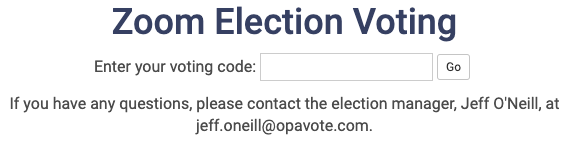
<p>A voter will use this secret code to access a voting page like this:</p>

<p><a href="/img/b/R29vZ2xl/AVvXsEi6NJjTUPsL5DZXM-x2ywf8efRyC5Q21MAKj2F3Lrzst90HUco837UDnJjCrVPKpTQsO-UEK0qHtpIVrECR68lJK-3Zd4Zb8TeaPntGYvS1YaOyNsKnzBQGiFdrrNeedRiqESC5S2gF3hmb/s1600/code+voting+box.png"><img src="/img/b/R29vZ2xl/AVvXsEi6NJjTUPsL5DZXM-x2ywf8efRyC5Q21MAKj2F3Lrzst90HUco837UDnJjCrVPKpTQsO-UEK0qHtpIVrECR68lJK-3Zd4Zb8TeaPntGYvS1YaOyNsKnzBQGiFdrrNeedRiqESC5S2gF3hmb/s1600/code+voting+box.png" alt="Screenshot of OpaVote page when voters enter their voting code" /></a></p>

<h3 id="re-using-codes-across-elections">Re-Using Codes Across Elections</h3>

<p>If you are going to be voting on multiple things during a single Zoom meeting, then it is far more convenient if each voter can use the same secret code for all of the elections. Fortunately, this is easy to do with OpaVote. Here are the steps:</p>

<ol>
  <li>Create a “Template” Election on the OpaVote management console. Give it a title that makes it clear that it is a template and is not to be used for an election.</li>
  <li>Add the desired number of codes to the template election.</li>
  <li>Email each voter one code to be used during the Zoom meeting.</li>
</ol>

<p>Then for each election you want to run (I’ll call these “real” elections), use the “Copy” button on our management console to copy the template election to a new election. When you copy the election, we copy all of the codes as well. You’ll want to do this in advance of your meeting so that all your real elections are ready to go when you need them. Fill in all the important information for each real election (title, candidates, etc.) but DO NOT change the code voters. Then click the “Start Voting” button so they are ready when you need them.</p>

<p>During the Zoom meeting, when you are ready to run a real election, you can paste the website address of the election into the Zoom meeting chat. The election address will look like this:</p>

<p>https://www.opavote.com/en/code/1234567890</p>

<p>Each participant in the Zoom meeting can click on that link to get to the voting page, type in their secret voting code, and then vote. You can do this for as many real elections as you like.</p>

<p>We hope this makes it easier for you to run your Zoom elections during these otherwise difficult times.  Stay safe everyone!</p>]]></content><author><name>Jeff</name></author><category term="user guides" /><summary type="html"><![CDATA[With the current unfortunate situation, most in-person meetings need to be cancelled. Organizations are still meeting up, but using services like Zoom to conduct their meetings. Where you previously held elections at an in-person meeting, you now need to figure out how to conduct your elections during a Zoom meeting (or Hangouts, Slack, Skype, etc.).]]></summary></entry><entry><title type="html">Three Most Common Voter Requests and How to Deal with Them</title><link href="https://blog.opavote.com/2019/12/three-most-common-voter-requests-and.html" rel="alternate" type="text/html" title="Three Most Common Voter Requests and How to Deal with Them" /><published>2019-12-15T00:00:00+00:00</published><updated>2019-12-15T00:00:00+00:00</updated><id>https://blog.opavote.com/2019/12/three-most-common-voter-requests-and</id><content type="html" xml:base="https://blog.opavote.com/2019/12/three-most-common-voter-requests-and.html"><![CDATA[<p><img src="/img/b/R29vZ2xl/AVvXsEiSyLywKgboDTo8MLmAKgGdWKUiPUqYMDnWZuRQkGRvc6HoVIb0-KwdMtQXPN2Gv3ccqrAozBT_fqOt6Xc_jMnqzreosX_UmQe14G7gDlKpZhdi4A8gfsVc1ihpRgAUM-me6Z1NOwNf1jQt/s640/voters.png" alt="Abstract drawing of a group of voters" />
For an election manager, running an <a href="https://www.opavote.com/">online election</a>, especially one with a lot of voters, can be a lot of work! In this blog post, we address the three most common voter requests, and how to handle them with OpaVote.</p>

<!-- excerpt end -->

<h3 id="voter-did-not-receive-a-voting-email">Voter did not receive a voting email</h3>

<p>A voter contacts you and says they didn’t receive a voter email. In many (I suspect most) instances, the voter did receive the email but can’t find it or accidentally deleted it. For example, voter emails to gmail, Yahoo, and the like should always be delivered.</p>

<p>Regardless, the best thing to do is to send them another voting email! This is easy to do from the management console:</p>

<ul>
  <li>click the link that looks like this: 100 email voters,</li>
  <li>on the following page, click the email address of the voter, and then</li>
  <li>click the “Send Reminder” button.</li>
</ul>

<p>You can do this as many times as you need to.</p>

<p>If the voter still hasn’t received the voting email, then you have two more options. First, disable the voter’s email address from the same page that you used to send a reminder email. Then, you can do one of the following:</p>

<ul>
  <li>get another email address from the voter and add it to the election, or</li>
  <li>create a code voter (see <a href="https://www.opavote.com/help/online-elections#e-editing">here</a>) and send the secret code to the voter along with the code voting link (looks like this: https://www.opavote.com/en/code/…).</li>
</ul>

<p>In some instances, it is possible that none of your voters received the voting email! This can happen</p>

<p>where all of your voters have an email with the same organization (e.g., a school or a company), and the organization has blocked emails from OpaVote. Because OpaVote sends many voting emails to the organization in a short period of time, the voting emails may be classified as spam and blocked.</p>

<p>When this happens, the best thing to do is to contact your IT department and ask them to whitelist emails from opavote.com. Your IT department may ask you to provide further information (such as our IP addresses). If this happens, just contact us, and we will provide whatever information is needed.</p>

<h3 id="opavote-says-voter-has-voted-but-voter-says-otherwise">OpaVote says voter has voted but voter says otherwise</h3>

<p>Each voting link can be used to vote only once. The voting link can be clicked on as many times as a voter likes, but once a vote has been cast with the voting link, OpaVote will respond with a message that the voter has already voted.</p>

<p>Sometimes a voter will get this message and insist that they haven’t yet voting. There are two possible reasons for this: (i) the voter actually voted and forgot, or (ii) the voter forwarded their voting email to someone else and someone else voted with the voting link.</p>

<p>When this happens, you have two options:</p>

<ul>
  <li>Tell the voter “sorry” but they cannot vote since the voting link has been used.</li>
  <li>Send another voting link to the voter (e.g., get another email address or create a code voter) to allow the voter to vote. Note that for anonymous elections (i.e., most elections) you cannot remove the vote from the voter’s original voting link.</li>
</ul>

<h3 id="opavote-voting-page-is-not-working">OpaVote voting page is not working</h3>

<p>OpaVote voting pages work on any device (e.g., phones, tablets, computers, etc.) and any commonly used browser. OpaVote has large numbers of voters casting votes every day, and our voting pages work fine for just about all of them!</p>

<p>Occasionally, a voter will complain that the voting page is not working for them. E.g., something on the page is cut off or the “Vote” button doesn’t work. This is caused by some unusual or buggy software that the voter has installed. We can’t help diagnose such problems, but there are few easy things the voter can do:</p>

<ul>
  <li>vote from a different device (e.g., computer instead of phone),</li>
  <li>vote with a different browser (e.g., Chrome instead of Safari),</li>
  <li>vote using an incognito mode of the browser, or</li>
  <li>disable all browser extensions before voting.</li>
</ul>

<p>We hope you find this information helpful, and we wish you successful elections!</p>]]></content><author><name>Jeff</name></author><category term="user guides" /><summary type="html"><![CDATA[For an election manager, running an online election, especially one with a lot of voters, can be a lot of work! In this blog post, we address the three most common voter requests, and how to handle them with OpaVote.]]></summary></entry><entry><title type="html">Duration of elections and polls now resets when you start voting</title><link href="https://blog.opavote.com/2019/09/duration-of-elections-and-polls-now.html" rel="alternate" type="text/html" title="Duration of elections and polls now resets when you start voting" /><published>2019-09-17T00:00:00+00:00</published><updated>2019-09-17T00:00:00+00:00</updated><id>https://blog.opavote.com/2019/09/duration-of-elections-and-polls-now</id><content type="html" xml:base="https://blog.opavote.com/2019/09/duration-of-elections-and-polls-now.html"><![CDATA[<p><img src="/img/b/R29vZ2xl/AVvXsEiBnrx_Fg047ManwIAZqX9TwyWbauJRefmQqctp7iLVFmWHo0MaNjl_-5Y7jouoRYqPpkjBmrSfDa3yHB5pm0WUNIQrvSeLmBDBWTEXSgpTLvsLbEpokIgW9eXdGDDngfcSH5P94JbC0KRV/s200/clock.png" alt="Drawing of an old-fashioned alarm clock" /></p>

<p>For our <a href="https://www.opavote.com/">online elections and polls</a>, we have an election duration that indicates how long your election is available on the OpaVote website. On our management console, we present an expiration date so that you know exactly when your election is no longer available.</p>

<p>We’ve never been completely happy with how we have implemented these durations, and we are tweaking it a bit to hopefully make it better and less confusing for our customers. <!-- excerpt end --> Here is a table that summarizes the changes:</p>

<style type="text/css">
  table.ov {
    color:#333;
    width:100%;
    border-spacing:1px;
    border-collapse:separate;
    padding:0 3px;
  }
  table.ov td, table.ov th {
    height:30px;
    text-align:center;
    width:auto;
  }
  table.ov th {background:#BBB;}
  table.ov td {background:#EEE;}
</style>

<table class="ov">
<tbody>
<tr><td></td><th>Before</th><th>Now</th></tr>
<tr><th>Free Duration</th><td>2</td><td>1</td></tr>
<tr><th>Paid Duration</th><td>12</td><td>10</td></tr>
<tr><th>Change on<br />
Voting Start</th><td>None</td><td>Duration resets to start<br />
of election or poll</td></tr>
 </tbody></table>

<p>We’ll explain this in more detail. Free duration is for people who have never made a payment to OpaVote, and paid duration is for people who have made at least one payment. By making a single payment of $10, all of your elections qualify for paid duration. Further, the $10 you paid can be applied to increase the limits on an election. Pretty good deal for $10.</p>

<p>The key change is that durations now reset when you start voting.</p>

<p>Before, your election would last 12 weeks, but if you started voting 11 weeks after creating your election, you would only have 1 week left. Some of our customers found this confusing and frustrating.</p>

<p>Now, your election can last 10 weeks, but if you start voting after 9 weeks, you now have 10 more weeks to finish your election!</p>

<p>Although we’ve slightly decreased the durations, we hope that resetting the duration when you start voting more than makes up for it.</p>

<p>If you need your election duration to last longer than what we’ve described above, then the next step is to extend your election by a year, and we charge another $50 for this per election. For now, if you need this extra duration, send us an email and we’ll take care of it. In the near future, we’ll have buttons on the management console to allow you to do this your self.</p>

<p>These changes are not retroactive so any elections that existed before today won’t have their durations change. One exception is that if you created an election before today and now start voting, then your election will be under the new duration rules after you start voting (10 weeks from voting start). The expiration date on the console will always be accurate. If this causes a problem for you, let us know and we’ll fix it.</p>

<p>All of the above applies to both our Elections and Polls. Since Counts don’t have a voting stage, the duration will be based on the creation of the Count and won’t ever reset.</p>

<p>We hope you like this change, and please feel free to provide us feedback on this change or about any other aspects of our services.</p>]]></content><author><name>Jeff</name></author><category term="product updates" /><summary type="html"><![CDATA[For our online elections and polls, we have an election duration that indicates how long your election is available on the OpaVote website. On our management console, we present an expiration date so that you know exactly when your election is no longer available. We’ve never been completely happy with how we have implemented these durations, and we are tweaking it a bit to hopefully make it better and less confusing for our customers.]]></summary></entry><entry><title type="html">Why we don’t support equal rankings in RCV elections</title><link href="https://blog.opavote.com/2019/08/why-we-dont-support-equal-rankings-in.html" rel="alternate" type="text/html" title="Why we don’t support equal rankings in RCV elections" /><published>2019-08-31T00:00:00+00:00</published><updated>2019-08-31T00:00:00+00:00</updated><id>https://blog.opavote.com/2019/08/why-we-dont-support-equal-rankings-in</id><content type="html" xml:base="https://blog.opavote.com/2019/08/why-we-dont-support-equal-rankings-in.html"><![CDATA[<p><img src="/img/b/R29vZ2xl/AVvXsEgpW86xd6KR8LFPF4_Wr4CHr-wLl_DT45c_6lQl5ZR9VIPPBbYINGBK92l47QY7UANtHadk0YNqZBPiBsw2LBmEwEAwOyQCohmEX3vU6equ6ECSTfVt-fusTF-OjreDLjvZsw-Fmc5kK9WC/s200/ballot.png" alt="Screenshot of a ranked-choice ballot" /></p>

<p>OpaVote specializes in <a href="https://www.opavote.com/">online elections</a> with ranked-choice voting. With ranked-choice voting, you can select your first choice, your second choice, and so forth.</p>

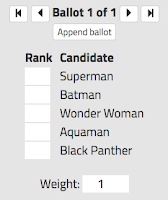
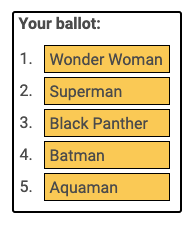
<p>You could imagine that a voter might want to give two candidates the same ranking. For example, using the ballot example here, a voter might want to rank <strong>both</strong> Wonder Woman and Superman first and rank Black Panther second.</p>

<p>Our user interface does not allow voters to specify equal rankings like this. We occasionally get asked to allow equal rankings in OpaVote, and in this blog post we explain why we won’t do so. The fundamental reason is a simple cost-benefit tradeoff.</p>

<!-- excerpt end -->

<p><strong>Benefits of Equal Rankings</strong></p>

<p>The benefit of allowing equal rankings is that the voter has increased ability to express his or her preferences about the candidates.</p>

<p>If a voter truly thinks two candidates are equal, however, then there is no harm in forcing the voter to give the two candidates different rankings. If the voter is equally happy with two candidates, then it doesn’t matter to him which is elected, and the order of the two candidates on the ballot doesn’t matter.</p>

<p>Accordingly, allowing equal rankings does not give much benefit to the voter because it does not give the voter any increased ability in electing a candidate important to the voter.</p>

<p><strong>Disadvantages of Equal Rankings</strong></p>

<p>One disadvantage of allowing equal rankings is that it can make the user interface for the ballot more complicated. Here is an example OpaVote ballot:</p>

<p><a href="/img/b/R29vZ2xl/AVvXsEi0-_XMu3oq6AIW9YLXbgszQrW1ZEDk9Ynlv7X70itPfbGZEo9eC4JUC1t93o0p4Xpa5dkvicdto9V7qP61t1NtDW80pBSDDPBB9kcYizCf1Zafs-2feOhKmksw56U4M1q6BcgrWTvEZuRv/s1600/rankedballot.png"><img src="/img/b/R29vZ2xl/AVvXsEi0-_XMu3oq6AIW9YLXbgszQrW1ZEDk9Ynlv7X70itPfbGZEo9eC4JUC1t93o0p4Xpa5dkvicdto9V7qP61t1NtDW80pBSDDPBB9kcYizCf1Zafs-2feOhKmksw56U4M1q6BcgrWTvEZuRv/s200/rankedballot.png" alt="Example ranked-choice ballot showing five candidates in a list" /></a></p>

<p>To allow a voter to give two or more candidates the same ranking, we would need to allow the voter to put more than one candidate on the same line. For an election with a large number of candidates (<a href="https://blog.opavote.com/2019/06/elections-with-large-number-of.html">which you should avoid anyway</a>), you might need to allow voters to give 10 or more candidates the same ranking. This would be especially complicated for a ballot on a mobile device.</p>

<p>Another disadvantage with equal rankings is that it makes the counting rules more complicated and harder for voters to understand. Suppose that a voter casts the following ballot:</p>

<ol>
  <li>Wonder Woman; Superman</li>
  <li>Black Panther</li>
</ol>

<p>Initially, I suppose Wonder Woman and Superman would each get half of a vote. But suppose that Superman is later eliminated. Would Superman’s half vote get transferred to Wonder Woman or Black Panther? I suppose it makes more sense to transfer the half vote to Wonder Woman, but it makes the counting logic more complicated.</p>

<p><strong>Equal Rankings in Practice</strong></p>

<p>Where ranked-choice voting is used for real government elections (e.g., San Francisco), it is possible for a voter to give two or more candidates the same ranking.  The equal ranking is called an “overvote” and it is treated as a voter error. When this happens, there are generally three different ways that that the equal ranking or overvote is handled:</p>

<ul>
  <li>Void – Any ballot with an equal ranking is void and does not count towards any candidate (even if there is a first choice for a single candidate).</li>
  <li>Stop – The ballot is counted until an equal ranking is reached. When an equal ranking is reached, the ballot is treated as exhausted and all further rankings (even non-equal ones) are ignored. San Francisco does this.</li>
  <li>Skip – Any equal rankings on the ballot are skipped and the next single ranking is counted. For the example ballot above, Black Panther would count as the first choice. Cambridge, Massachusetts does this.</li>
</ul>

<p>In practice, all ranked-choice voting counting rules that I have seen treat an equal ranking as an error.</p>

<p>OpaVote is actually able to process BLT files that indicate equal rankings (see the <a href="https://www.opavote.com/help/overview#blt-file-format">BLT file format documentation</a>), and will process them using “Skip” except for San Francisco and Oakland RCV which process them using “Stop”.</p>]]></content><author><name>Jeff</name></author><category term="user guides" /><summary type="html"><![CDATA[OpaVote specializes in online elections with ranked-choice voting. With ranked-choice voting, you can select your first choice, your second choice, and so forth. You could imagine that a voter might want to give two candidates the same ranking. For example, using the ballot example here, a voter might want to rank both Wonder Woman and Superman first and rank Black Panther second. Our user interface does not allow voters to specify equal rankings like this. We occasionally get asked to allow equal rankings in OpaVote, and in this blog post we explain why we won’t do so. The fundamental reason is a simple cost-benefit tradeoff.]]></summary></entry><entry><title type="html">Elections where a winning candidate withdraws</title><link href="https://blog.opavote.com/2019/08/elections-where-winning-candidate.html" rel="alternate" type="text/html" title="Elections where a winning candidate withdraws" /><published>2019-08-14T00:00:00+00:00</published><updated>2019-08-14T00:00:00+00:00</updated><id>https://blog.opavote.com/2019/08/elections-where-winning-candidate</id><content type="html" xml:base="https://blog.opavote.com/2019/08/elections-where-winning-candidate.html"><![CDATA[<p><img src="/img/b/R29vZ2xl/AVvXsEgm7x7N4a4l7ysz0AgqN1bGC9BRNaDTK7zQGomnz6oatehJeXhY0EVKkTv_DFjWaOmLxuYwViQqnXtfXaZ0TRogX7iiLkuQO7yvf-VOHMXsQ0-2J7uGr3UThYPJUjDLix3uXlDUaD7SY4Gi/s200/stop.jpg" alt="No entry traffic sign, a red circle with a white rectangle in the center" /></p>

<p><a href="https://www.opavote.com/">Online elections</a> don’t always go according to plan… For example, during an election, it is possible that a candidate may decide that she is no longer able or no longer willing to assume the duties of the position being elected. We describe this as a candidate “withdrawing” from the election. In this post, we explain how  to handle withdrawn candidates with OpaVote.</p>

<!-- excerpt end -->

<h3 id="removing-a-candidate-and-recounting-votes">Removing a Candidate and Recounting Votes</h3>

<p>Let’s say that you are the manager of an OpaVote Election. Voting is complete and you have election results. Before you announce the results you learn that one of the winners has withdrawn. OpaVote allows you to remove the withdrawn candidate and recount the votes.</p>

<p>The process works as follows:</p>

<ol>
  <li>Download the ballots from the Election. We have a “Download Ballots” button on the results page.</li>
  <li>Create an OpaVote Count. This is one the three options from our management console.</li>
  <li>Upload the ballots you just downloaded into the OpaVote Count with the “Upload Ballots” button.</li>
  <li>Use the “Withdraw Candidates” button to remove the withdrawn candidate (you can also withdraw more than one if you need to).</li>
  <li>Count the ballots using your preferred counting method.</li>
</ol>

<p>We will then count the ballots as if the withdrawn candidate had not been on the ballots at all.  For example, if the withdrawn candidate was ranked first on a ballot, that ranking will be removed, and the second-ranked candidate will become the first-ranked candidate.</p>

<p>Note that you may need to pay an additional fee for the Count. Though if you do, it is often significantly less than the cost of the Election since the fee is based on the number of votes received and not the total number of voters.</p>

<h3 id="rerun-the-election">Rerun the Election?</h3>

<p>Another thing to consider is whether you should rerun the entire election. For example, suppose there were three candidates competing for a position, you ran the election using <a href="https://www.opavote.com/methods/traditional-plurality-voting">plurality or checkbox voting</a>, and the winner withdraws from the election.</p>

<p>You could just elect the person who came in second, but this does not seem fair because you are not taking into account the votes of everyone who voted for the withdrawn candidate. The best option in this situation is to rerun the election.</p>

<p>With <a href="https://www.opavote.com/methods/ranked-choice-voting">ranked-choice voting</a>, you probably do not need to rerun the election, because everyone who voted for the withdrawn candidate will have their votes counted for their second choices.</p>]]></content><author><name>Jeff</name></author><category term="user guides" /><summary type="html"><![CDATA[Online elections don’t always go according to plan… For example, during an election, it is possible that a candidate may decide that she is no longer able or no longer willing to assume the duties of the position being elected. We describe this as a candidate “withdrawing” from the election. In this post, we explain how  to handle withdrawn candidates with OpaVote.]]></summary></entry></feed>